Reimagining the In-Store Experience through a Self-Scanning Ecosystem
Reimagining the In-Store Experience through a Self-Scanning Ecosystem
End to end Product Design
User Research
UX/UI design and rapid prototyping
User Research
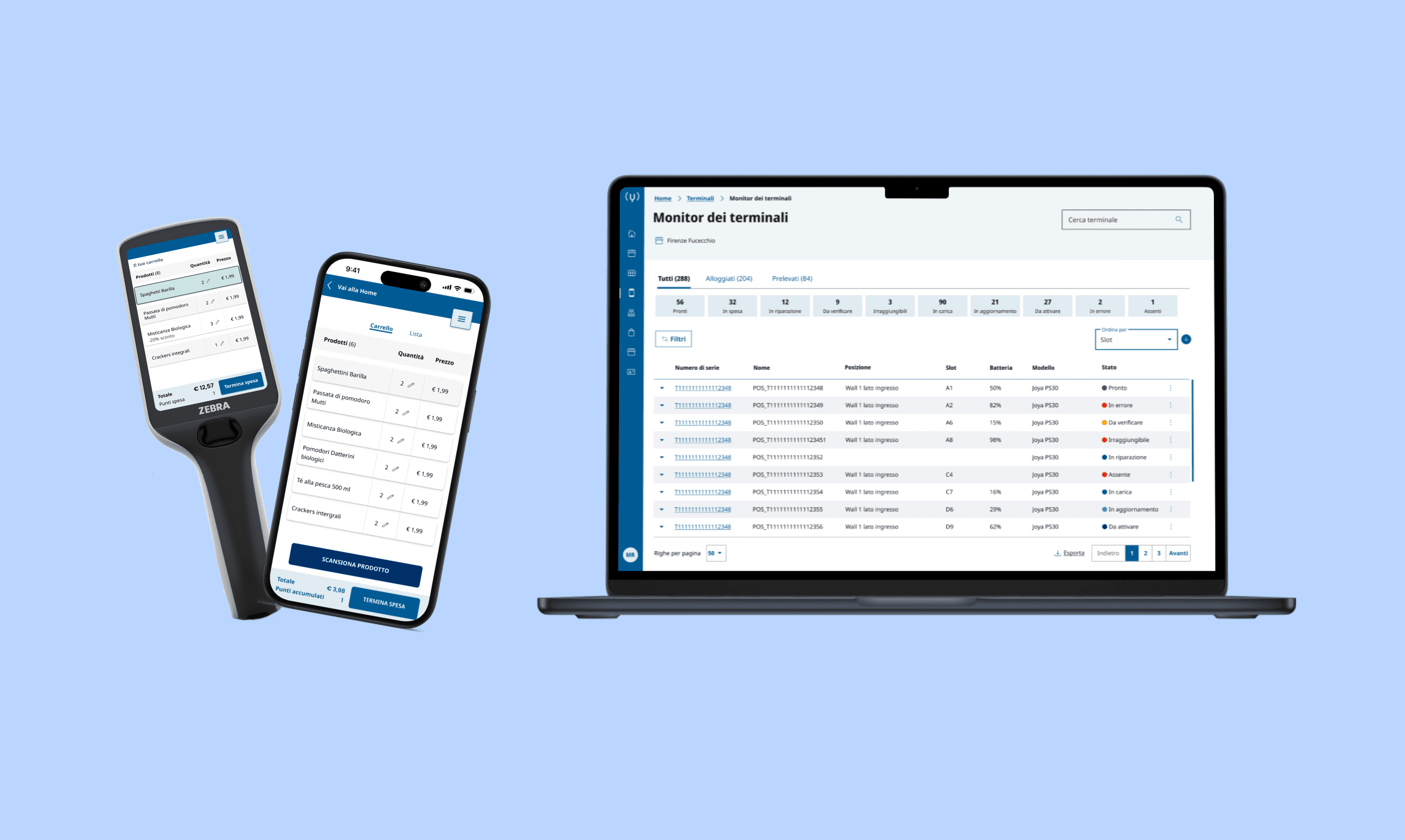
Overview
My role
Senior UX and Service Designer
I led the end to end design of the product from the initial analysis to the final shipment to developers.
Timeline
2023 - 2024
2023 - 2024
Team
4Store Team
4Store Team
Design, Engineering, analysts.
Design, Engineering, analysts.
Outcome
An ecosystem for self-scanning in retail
An ecosystem for self-scanning in retail
A mobile application, an application for scanning devices and a back-end application.
A mobile application, an application for scanning devices and a back-end application.
In collaboration with a multidisciplinary team of designers, developers, and retail domain experts, I contributed to the design of several products for the retail sector.
Among them was a self-scanning ecosystem developed for both dedicated handheld devices and mobile applications.The solution included customer-facing interfaces as well as a back-office system for retail staff, supporting end-to-end in-store operations.
Together with a multi disciplinary team of designer, I led the design process from the initial on field research to the final design and shipment of the product.
During this process, several relevant stakeholders (e.g. prospects, field experts ) were involved to allow us to build a product meeting clients’ and market expectations.
In collaboration with a multidisciplinary team of designers, developers, and retail domain experts, I contributed to the design of several products for the retail sector.
Among them was a self-scanning ecosystem developed for both dedicated handheld devices and mobile applications.The solution included customer-facing interfaces as well as a back-office system for retail staff, supporting end-to-end in-store operations.
Together with a multi disciplinary team of designer, I led the design process from the initial on field research to the final design and shipment of the product.
During this process, several relevant stakeholders (e.g. prospects, field experts ) were involved to allow us to build a product meeting clients’ and market expectations.
3
Customers who purchased this product
Some of the leading retailers in Italy purchased modules of this product.
3
White label fully customisable products
All products were designed as modular and fully customisable.
An iterative, collaborative process
Market research
Conducted competitive research and analysis to identify strengths, weaknesses, and friction points in existing self-scanning experiences.
Conducted competitive research and analysis to identify strengths, weaknesses, and friction points in existing self-scanning experiences.
Observation
Conducted competitive research and analysis to identify strengths, weaknesses, and friction points in existing self-scanning experiences.
Conducted competitive research and analysis to identify strengths, weaknesses, and friction points in existing self-scanning experiences.
Mapping the TO BE
Mapped the end-to-end user journeys for both the handheld device and mobile application, identifying friction points and opportunities for improvement.
Define design pillars
Defined four core design principles to guide co-design workshops and inform prototype development.
Defined four core design principles to guide co-design workshops and inform prototype development.
Exploring AI
Conducted competitive research and analysis to identify strengths, weaknesses, and friction points in existing self-scanning experiences.
Conducted competitive research and analysis to identify strengths, weaknesses, and friction points in existing self-scanning experiences.
Co-design workshop
Designed and facilitated a co-design workshop with key stakeholders to align on product vision and define core features.
Design and develop
Conducted competitive research and analysis to identify strengths, weaknesses, and friction points in existing self-scanning experiences.
4Store: A Modular Digital Ecosystem for Retail
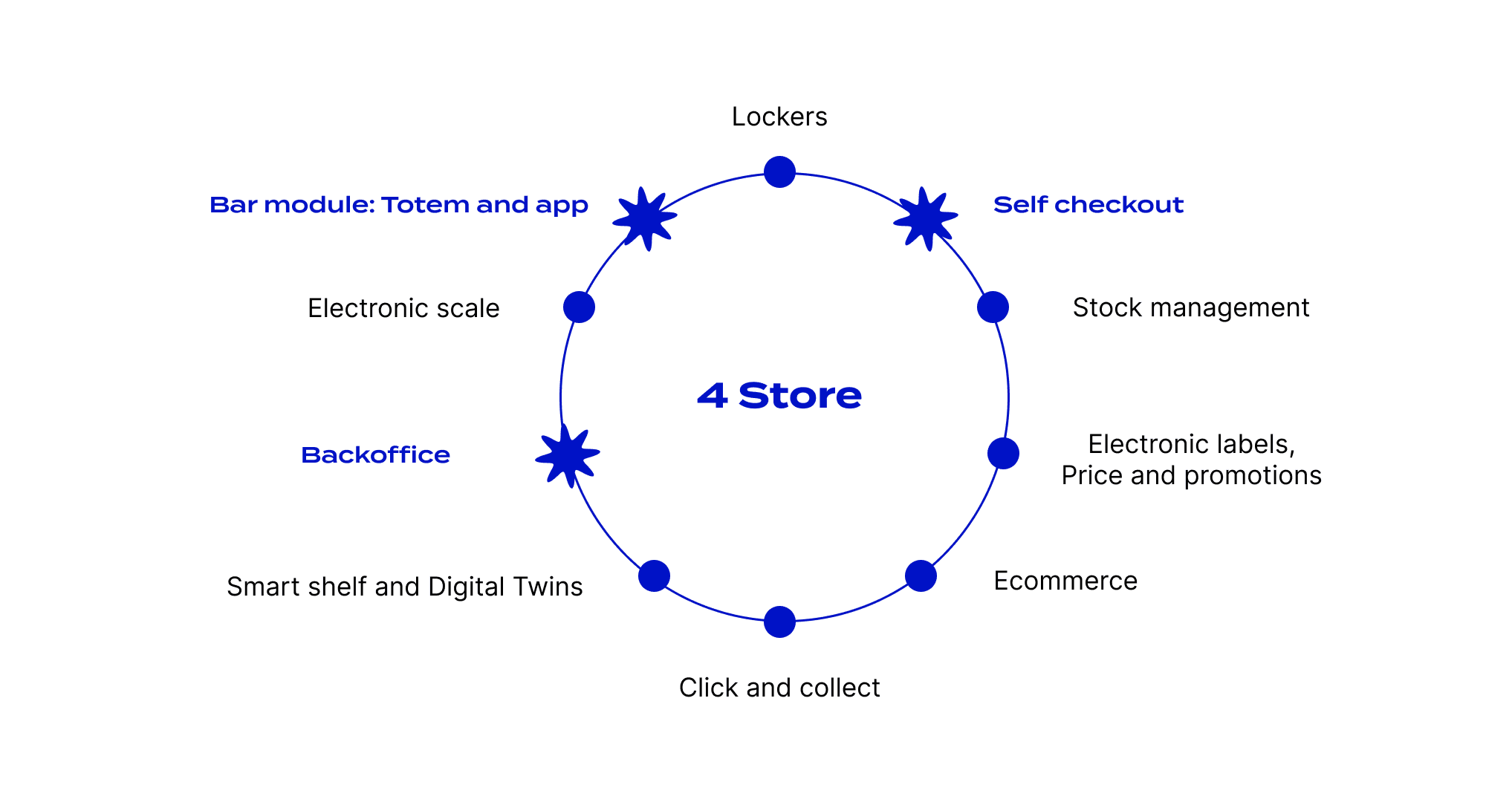
Starting with the Foundations: Understanding the Context
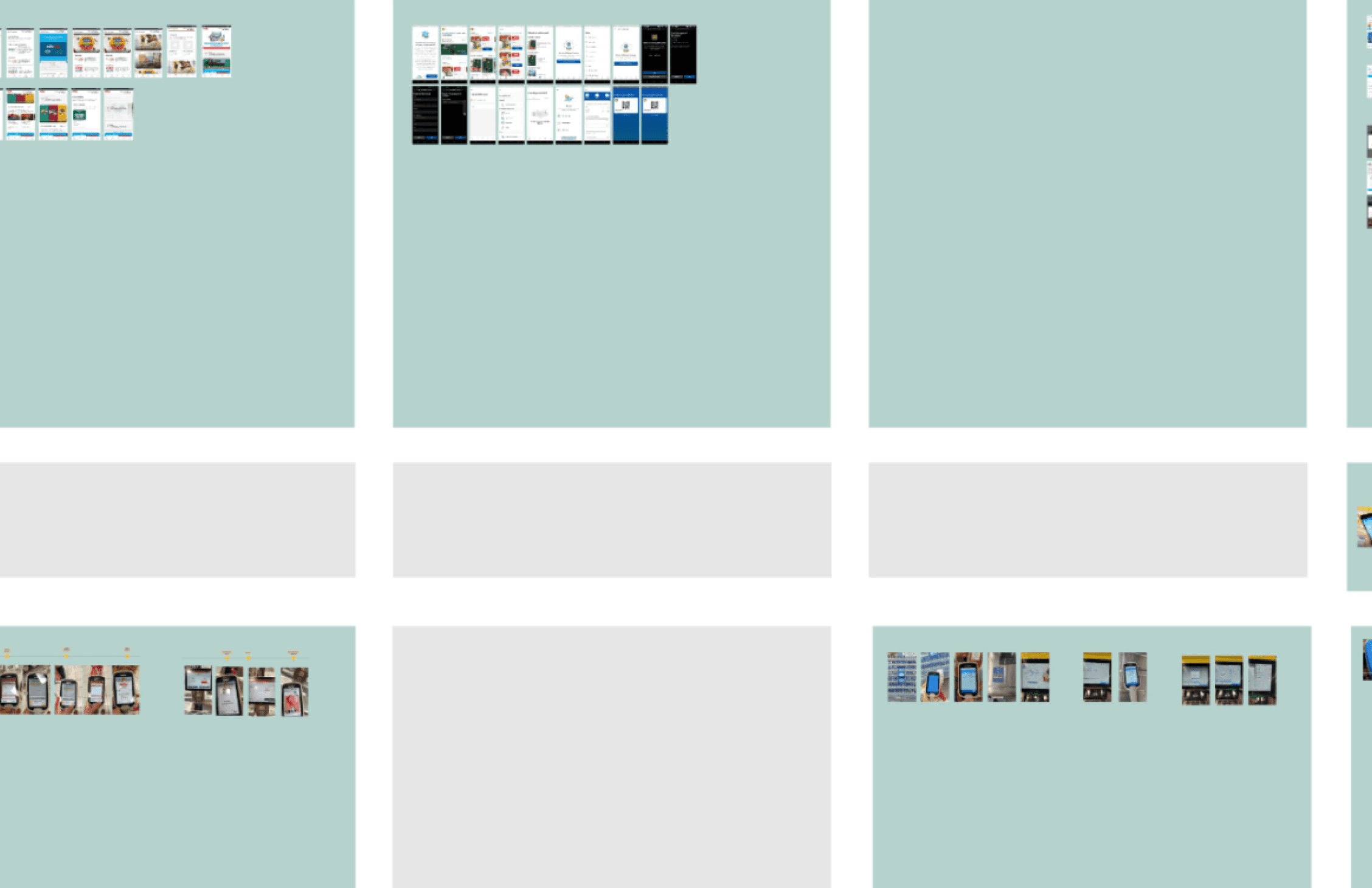
Collecting contextual evidence
Collecting contextual evidence
We analysed the market for self-scanning devices and evaluated the checkout experiences offered by key competitors in the retail industry. Our focus was on the user experience and the types of devices employed across different solutions.
The solution encompassed both customer-facing interfaces and a back-office system for retail staff, supporting end-to-end in-store operations.
We analysed the market for self-scanning devices and evaluated the checkout experiences offered by key competitors in the retail industry. Our focus was on the user experience and the types of devices employed across different solutions.
The solution encompassed both customer-facing interfaces and a back-office system for retail staff, supporting end-to-end in-store operations.
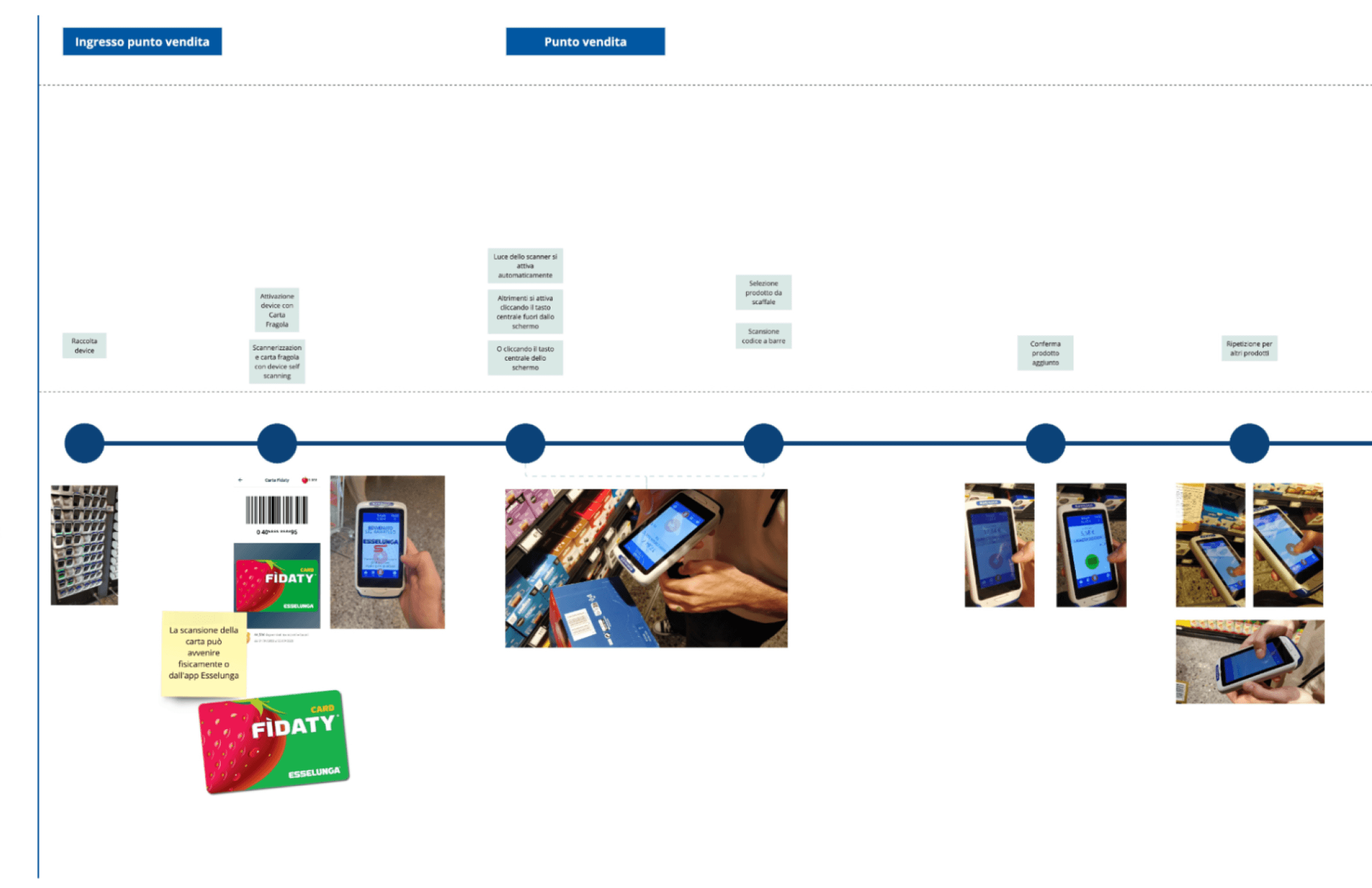
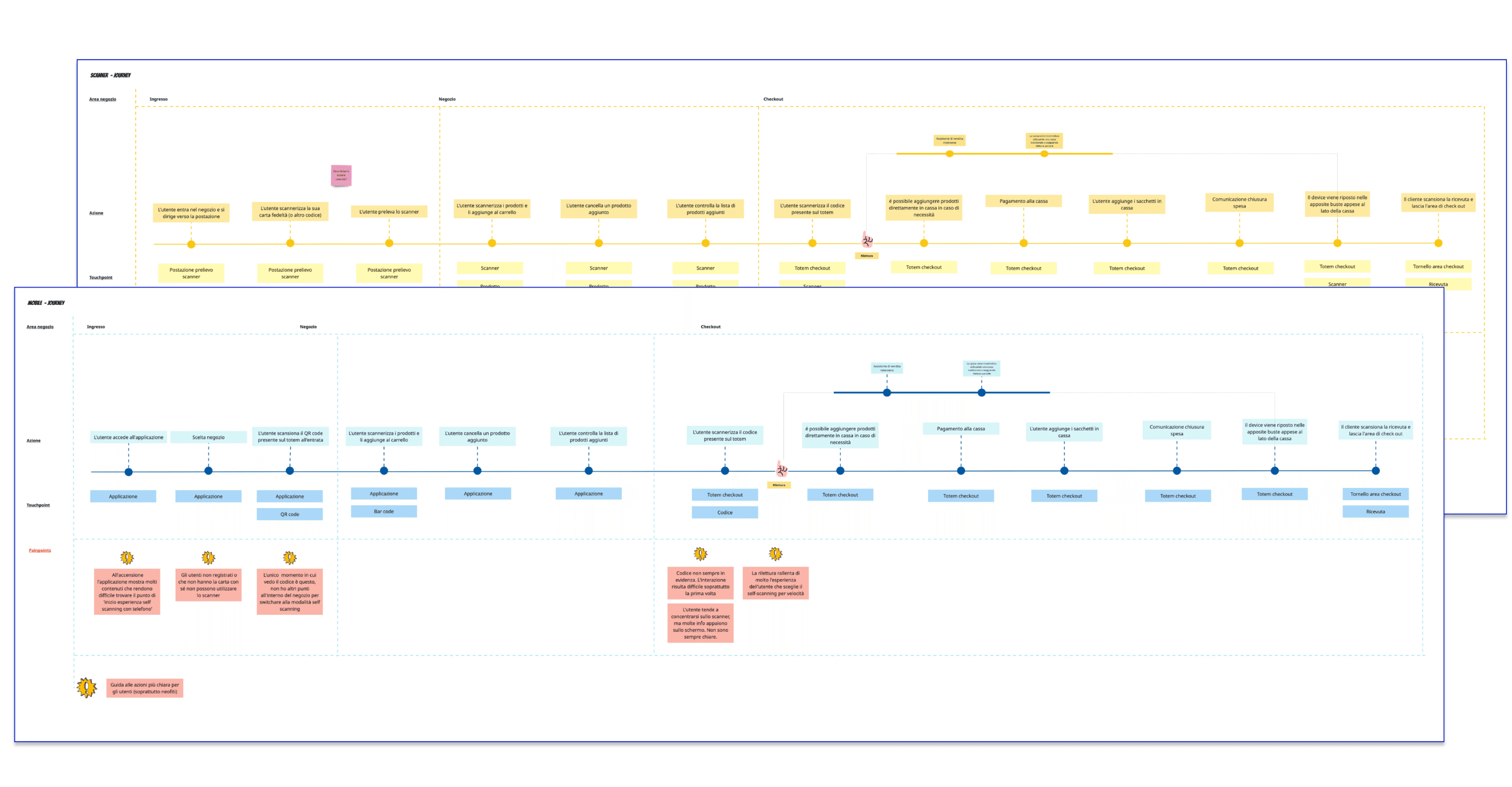
Mapping the journey
We analysed several competitor experiences to deepen our understanding of the in-store self-scanning journey. These insights were synthesised into a series of journey maps, which served as a reference throughout the design process.
We analysed several competitor experiences to deepen our understanding of the in-store self-scanning journey. These insights were synthesised into a series of journey maps, which served as a reference throughout the design process.
Mapping the desired experience
To map the in-store self-scanning experience, I created several customer journey maps. These helped us identify the main pain points, user needs, and opportunities for improvement within the shopping experience. The journey maps served as the starting point for the redesign.
Defining concept pillars: how will the product look like?
The redesign of the self-scanning experience was guided by four key design pillars:
Speed
Speed
Allow customers to purchase everything they need quickly
Allow customers to purchase everything they need quickly
Allow customers to purchase everything they need quickly
Accessibilty
Accessibilty
Create an inclusive and accessible product.
Create an inclusive and accessible product.
Personalization
Personalization
Develop a product tailored to users' needs.
Develop a product tailored to users’ needs.
Flexibility
Flexibility
The product adapts to changing conditions in the store.
The product adapts to changing conditions in the store.
Codesigning the product with field experts
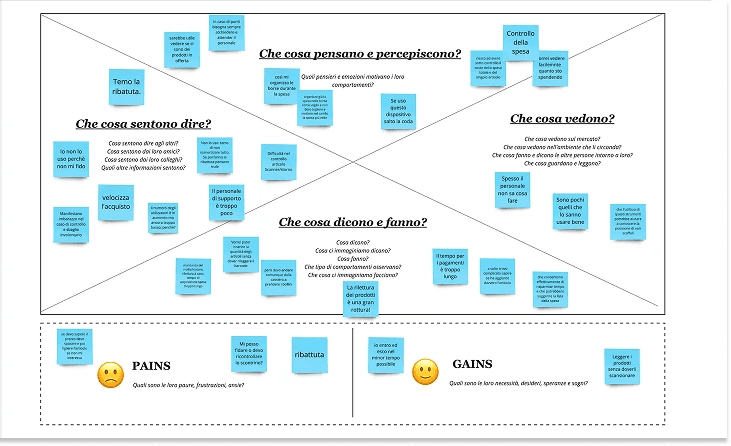
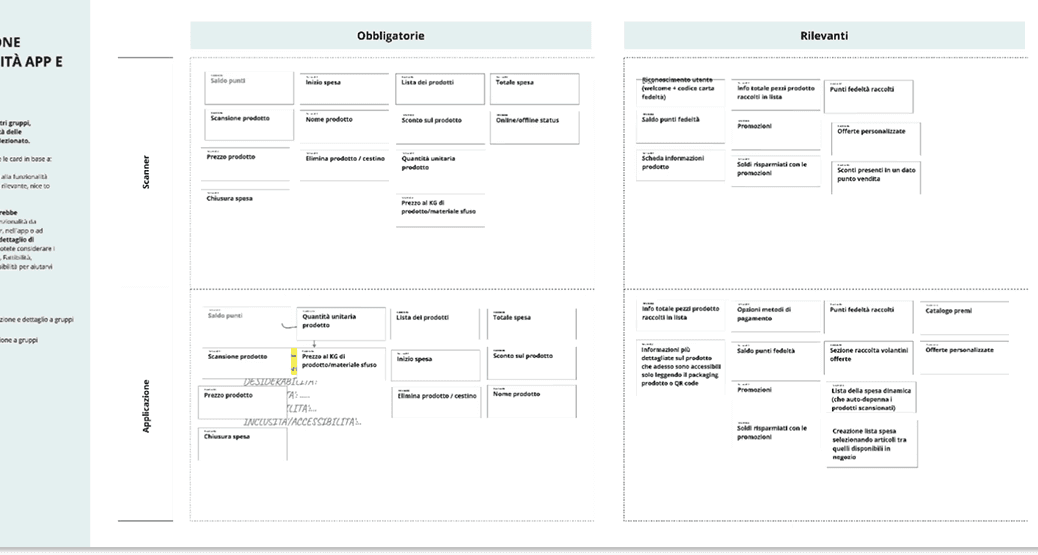
To gather useful insights for designing the product, we led two codesign sessions. The aim of these sessions was prioritizig the most relevant product features and understand which features to include in the app and scanner.
Empathy map
Empathy map
OBJECTIVE
OBJECTIVE
Encourage participants to think from the users’ perspective, which is crucial for the next steps of the workshop.
Encourage participants to think from the users’ perspective, which is crucial for the next steps of the workshop.
ACTIVITY
ACTIVITY
We asked participants to empathise with users by working with an empathy map canvas, exploring their feelings, pains, and gains.
We asked participants to empathise with users by working with an empathy map canvas, exploring their feelings, pains, and gains.
Prioritization canvas
Prioritization canvas
OBJECTIVE
OBJECTIVE
Prioritise functionalities to identify the most relevant ones.
Prioritise functionalities to identify the most relevant ones.
ACTIVITY
ACTIVITY
Participants were then asked to prioritise functionalities based on their experience in the retail sector, categorising them into three groups: must-have, nice-to-have, and not relevant.
Participants were then asked to prioritise functionalities based on their experience in the retail sector, categorising them into three groups: must-have, nice-to-have, and not relevant.

App or scanner?
App or scanner?
OBJECTIVE
OBJECTIVE
Prioritise functionalities across the two devices.
Prioritise functionalities across the two devices.
Prioritise functionalities across the two devices.
ACTIVITY
ACTIVITY
Participants were then asked to prioritise functionalities based on their experience in the retail sector, categorising them into three groups: must-have, nice-to-have, and not relevant.
Participants were then asked to prioritise functionalities based on their experience in the retail sector, categorising them into three groups: must-have, nice-to-have, and not relevant.
The final product: app and scanner
The final product: app and scanner
In this chapter, some screens and relevant features of the scanner application are shown. The mobile application follows a similar approach but with some additional features dedicated to brand’s clients.
In this chapter, some screens and relevant features of the scanner application are shown. The mobile application follows a similar approach but with some additional features dedicated to brand’s clients.
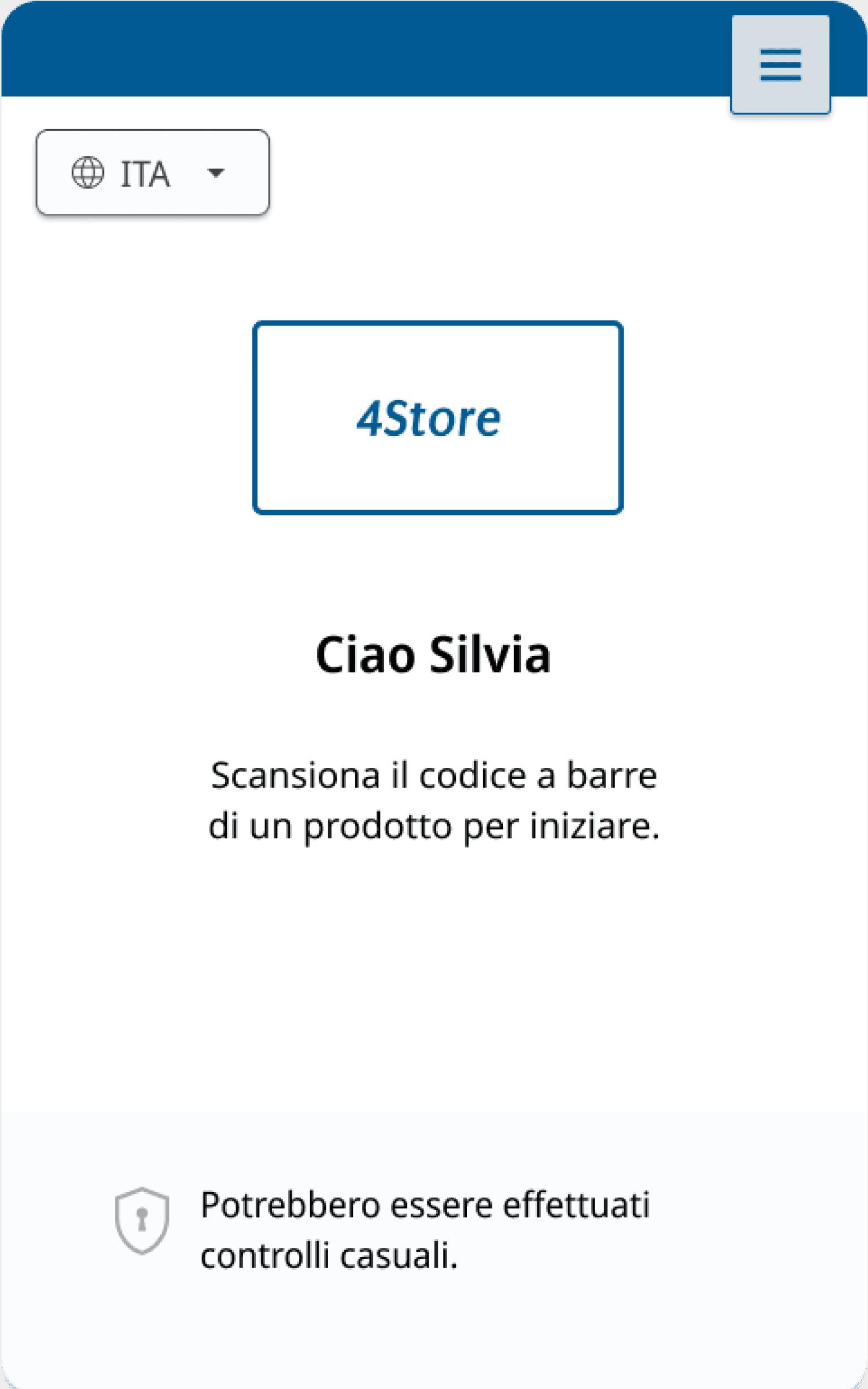
Landing page
Landing page
Accessibility
LANGUAGE SELECTION
LANGUAGE SELECTION
Users can select their preferred language before starting their experience. Languages preferences can be accessed anytime from the settings section.
Users can select their preferred language before starting their experience. Languages preferences can be accessed anytime from the settings section.
Accessibility
SUPPORT TEXT
SUPPORT TEXT
First-time users are guided through the steps of using and experiencing self-scanning with the help of supporting text.
First-time users are guided through the steps of using and experiencing self-scanning with the help of supporting text.
Accessibility
SECURITY CHECKS ALERT
SECURITY CHECKS ALERT
Users are notified about potential security checks at the checkout as they will approach the end of their shopping.
Users are notified about potential security checks at the checkout as they will approach the end of their shopping.
Cart

Speed
Flexibility
CART AS HOMEPAGE
CART AS HOMEPAGE
The cart screen serves as the home of the experience, similar to an e-commerce cart. Scanned products appear at the top of the list and are highlighted in green.
The cart screen serves as the home of the experience, similar to an e-commerce cart. Scanned products appear at the top of the list and are highlighted in green.
Speed
Flexibility
PRODUCT NUMBER
PRODUCT NUMBER
The product count is displayed next to the product list title, freeing up space at the bottom for more relevant information, such as the total amount and collected points.
The product count is displayed next to the product list title, freeing up space at the bottom for more relevant information, such as the total amount and collected points.
Speed
Accessibility
TOTAL AND CHECKOUT
TOTAL AND CHECKOUT
All checkout-related information is located at the bottom of the screen, where users proceed to finalise their shopping. The total amount and collected points are also displayed here.
All checkout-related information is located at the bottom of the screen, where users proceed to finalise their shopping. The total amount and collected points are also displayed here.
Product Page
Speed
Personalization
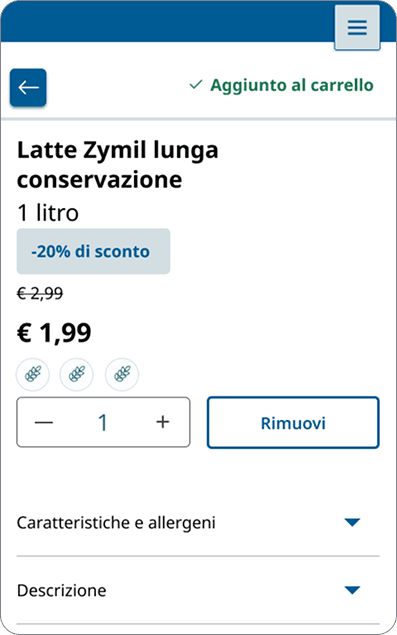
ADDED TO CART
ADDED TO CART
When a product is scanned, its page is displayed for five seconds. If users do not interact with the screen, it returns to the homepage; if they interact, the screen remains active. Users can return to the homepage anytime using the back button.
When a product is scanned, its page is displayed for five seconds. If users do not interact with the screen, it returns to the homepage; if they interact, the screen remains active. Users can return to the homepage anytime using the back button.
Accessibility
SUPPORT TEXT
SUPPORT TEXT
First-time users are guided through the steps of using and experiencing self-scanning with the help of supporting text.
First-time users are guided through the steps of using and experiencing self-scanning with the help of supporting text.
Accessibility
SECURITY CHECKS ALERT
SECURITY CHECKS ALERT
Users are notified about potential security checks at the checkout as they will approach the end of their shopping.
Users are notified about potential security checks at the checkout as they will approach the end of their shopping.
Fresh food counter

Speed
Personalization
BOOKING AT THE FRESH FOOD COUNTER
BOOKING AT THE FRESH FOOD COUNTER
Users can book a slot at the fresh food counter by accessing this section and taking a digital number.
Users can book a slot at the fresh food counter by accessing this section and taking a digital number.
Speed
Personalization
ALERTS
ALERTS
When the employee is about to call their number, the device vibrates and displays this screen, prompting the user to head to the fresh food counter to purchase their desired products.
When the employee is about to call their number, the device vibrates and displays this screen, prompting the user to head to the fresh food counter to purchase their desired products.
Behind the scenes: the backoffice application
Behind the scenes: the backoffice application
In this chapter, some screens and relevant features of the Backoffice application are shown, including the backoffice homepage, current shopping monitoring, backoffice homepage
Back-office homepage
Back-office homepage
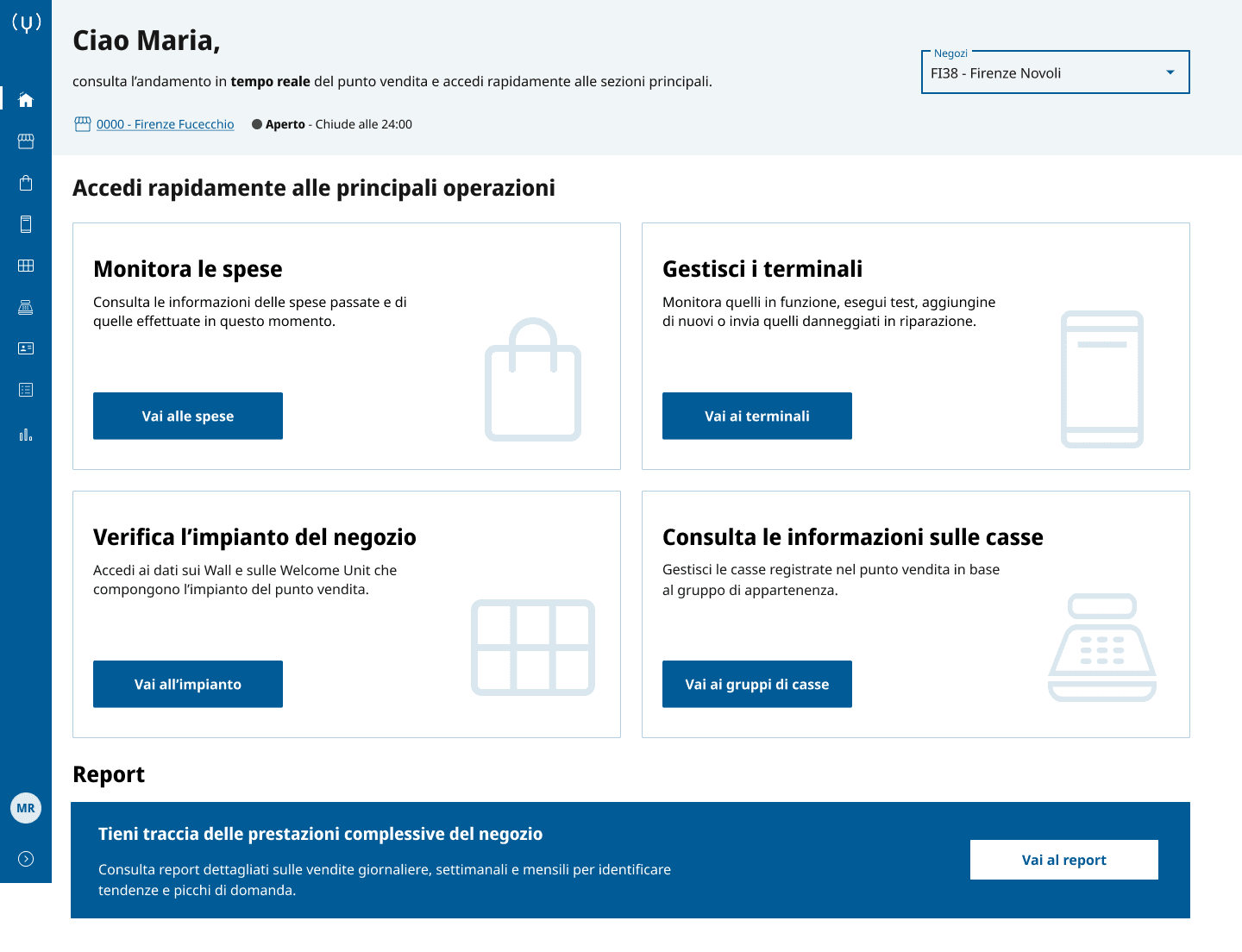
ENTRY POINT
ENTRY POINT
The homepage serves as the entry point to all key sections of the back-office application. While all sections are accessible via the menu, the most relevant ones are highlighted with dedicated cards.
The homepage serves as the entry point to all key sections of the back-office application. While all sections are accessible via the menu, the most relevant ones are highlighted with dedicated cards.
The homepage serves as the entry point to all key sections of the back-office application. While all sections are accessible via the menu, the most relevant ones are highlighted with dedicated cards.
STORE SWITCH
STORE SWITCH
Some users (Super Admin, Admin) have visibility across multiple stores and can switch between them using the dropdown in the top-right corner of the homepage.
Some users (Super Admin, Admin) have visibility across multiple stores and can switch between them using the dropdown in the top-right corner of the homepage.
Some users (Super Admin, Admin) have visibility across multiple stores and can switch between them using the dropdown in the top-right corner of the homepage.
ACCESS TO REPORTS
ACCESS TO REPORTS
While users can monitor one store at a time in real-time, reports for all stores are accessible through the Reports section. This enables long-term monitoring of data across stores.
While users can monitor one store at a time in real-time, reports for all stores are accessible through the Reports section. This enables long-term monitoring of data across stores.
While users can monitor one store at a time in real-time, reports for all stores are accessible through the Reports section. This enables long-term monitoring of data across stores.
Back-office homepage
Back-office homepage
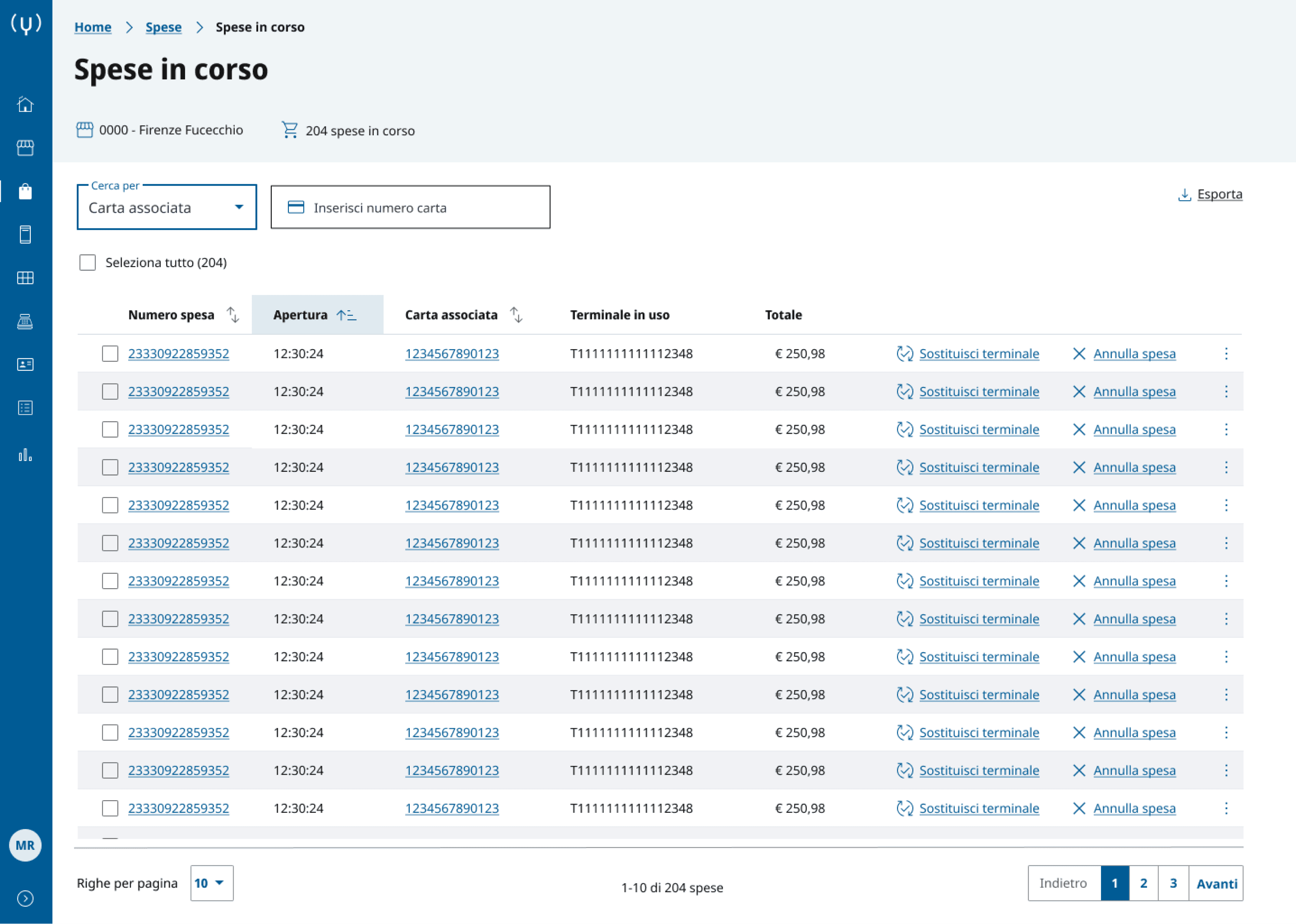
LIVE MONITORING
LIVE MONITORING
On this page, users can monitor all customers using self-scanning devices in-store. They have an overview of the most relevant information needed for safety and customer support.
On this page, users can monitor all customers using self-scanning devices in-store. They have an overview of the most relevant information needed for safety and customer support.
On this page, users can monitor all customers using self-scanning devices in-store. They have an overview of the most relevant information needed for safety and customer support.
ACCESS TO SHOPPING DETAILS
ACCESS TO SHOPPING DETAILS
By clicking on the shopping ID, users can access the customer’s current cart and monitor all actions taken since the start of their in-store session, including all scanned products.
By clicking on the shopping ID, users can access the customer’s current cart and monitor all actions taken since the start of their in-store session, including all scanned products.
By clicking on the shopping ID, users can access the customer’s current cart and monitor all actions taken since the start of their in-store session, including all scanned products.
PRIORITIZED ACTIONS
PRIORITIZED ACTIONS
Key actions, such as “change device” and “delete a shopping session”, are available directly on the page, while less frequent actions like “switch on the LED light” are placed in the menu.
Key actions, such as “change device” and “delete a shopping session”, are available directly on the page, while less frequent actions like “switch on the LED light” are placed in the menu.
Back-office homepage
Back-office homepage
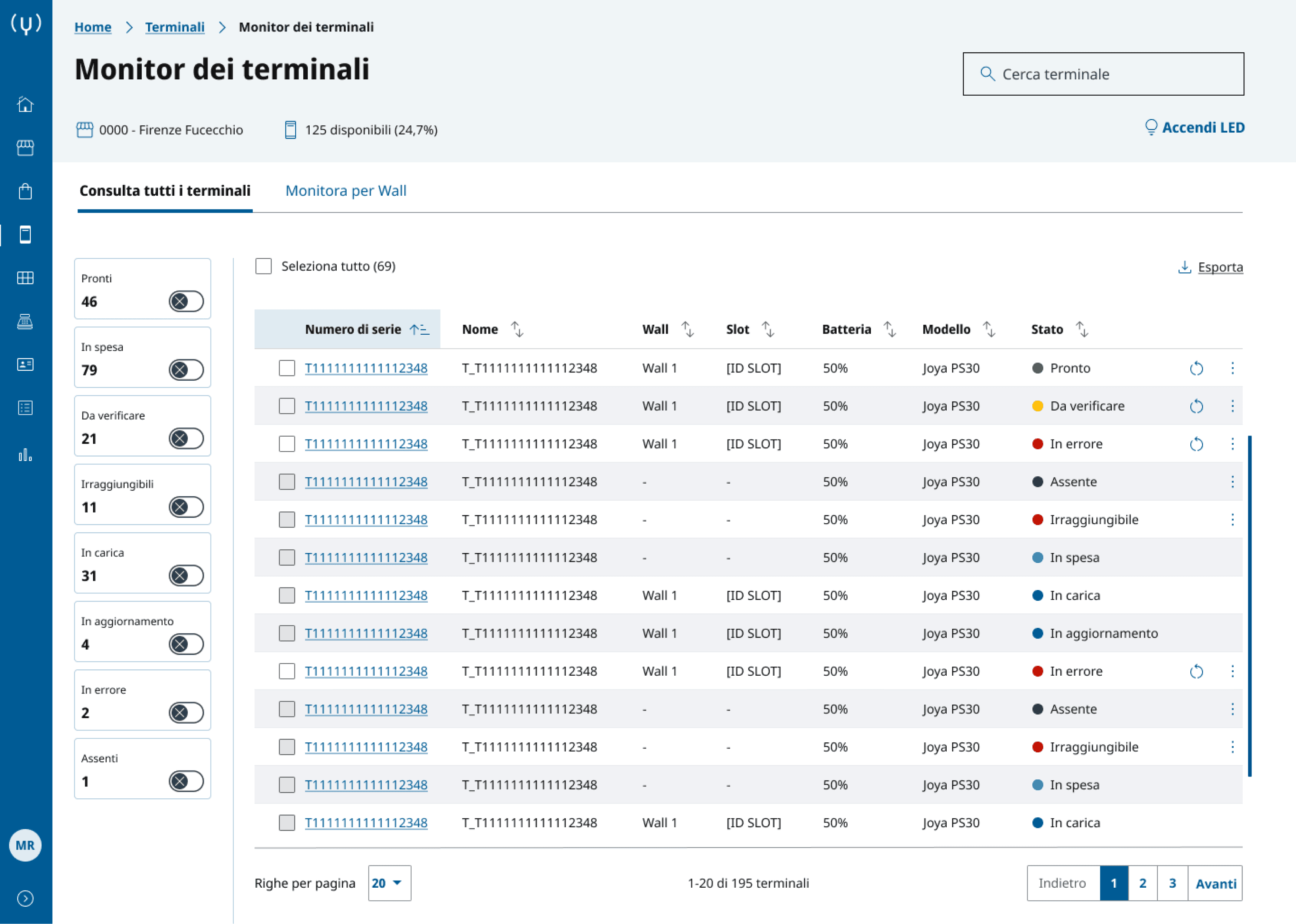
DOUBLE VIEW
DOUBLE VIEW
Devices can be monitored using two views: a table view or a wall view. In this section, we se the table view, where users can take a look at all devices in the store. Actions change according to status.
Devices can be monitored using two views: a table view or a wall view. In this section, we se the table view, where users can take a look at all devices in the store. Actions change according to status.
Devices can be monitored using two views: a table view or a wall view. In this section, we se the table view, where users can take a look at all devices in the store. Actions change according to status.
FILTER BY STATUS
FILTER BY STATUS
Devices can be filtered by status. The filter is made visible on the left, to make it more accessible and increase the speed for users. The default view shows all devices, filters can be activated clicking on the toggles.
Devices can be filtered by status. The filter is made visible on the left, to make it more accessible and increase the speed for users. The default view shows all devices, filters can be activated clicking on the toggles.
ACCESS TO THE DEVICE PAGE
ACCESS TO THE DEVICE PAGE
By clicking on the serial number, users can access the device page. This includes all information regarding the device, including information about use and maintainance, battery levels and last shopping.
By clicking on the serial number, users can access the device page. This includes all information regarding the device, including information about use and maintainance, battery levels and last shopping.